| Message |
|
Author |
|
by SKaVeN » Wed Sep 08, 2010 6:48 pm
You mean all I have to do is become a father??? Damnit! Why didn't any of you buggers tell me that?!! 
|
|
SKaVeN
Ned Flanders
Joined: Fri Aug 26, 2005 12:51 am Posts: 2065 Karma: 3.20 (66 thanks) Location: Adelaide
|
| Wed Sep 08, 2010 6:48 pm |
|
 |
|
by narly » Thu Sep 09, 2010 6:53 pm
SKaVeN wrote: You mean all I have to do is become a father??? Damnit! Why didn't any of you buggers tell me that?!!  Nah you don't have to be a dad , I'm not , well not that I know of 
|
|
narly
Troy McLure
Joined: Thu Feb 12, 2004 7:56 pm Posts: 43562 Karma: 477.28 (207914 thanks) Location: Radelaide
|
| Thu Sep 09, 2010 6:53 pm |
|
 |
|
by narly » Fri Oct 01, 2010 6:57 pm
 My TF7100HDPlus arrived today  all plugged in and working well  . Problem now is my JVC lcd is not true widescreen 
|
|
narly
Troy McLure
Joined: Thu Feb 12, 2004 7:56 pm Posts: 43562 Karma: 477.28 (207914 thanks) Location: Radelaide
|
| Fri Oct 01, 2010 6:57 pm |
|
 |
|
by SKaVeN » Fri Oct 01, 2010 7:03 pm
Just type the problem in Google. There'll be someone else with one asking the same PVR & TV asking the same thing somewhere. 
|
|
SKaVeN
Ned Flanders
Joined: Fri Aug 26, 2005 12:51 am Posts: 2065 Karma: 3.20 (66 thanks) Location: Adelaide
|
| Fri Oct 01, 2010 7:03 pm |
|
 |
|
by narly » Fri Oct 01, 2010 7:27 pm
I know the answer , new tv 
|
|
narly
Troy McLure
Joined: Thu Feb 12, 2004 7:56 pm Posts: 43562 Karma: 477.28 (207914 thanks) Location: Radelaide
|
| Fri Oct 01, 2010 7:27 pm |
|
 |
|
by Strayan » Tue Oct 19, 2010 12:55 pm
sharkboi wrote: . . . . anyone know how to convert .TS files to .AVI files for making video clips? I have tried a couple of programs but so far the audio seems to out of sync in the resulting .avi's...  The best free way with .ts & .tp files is to convert them first to MPEG2 with HDTVtoMPEG2 and then get a frame accurate conversion with VirtualDub (with the MPEG2 plugin) or some use VirtualDub-MPEG2. If using VirtualDub (which I prefer) unzip into a folder & make a separate folder inside it called "plugins32" (without the ") and put the MPEG2 plugin in this folder. This will then convert the mpeg file to avi using whatever avi codecs you have installed on your PC. Both apps are self-contained programs so neither needs installation. I use HDTVtoMPEG2 if my VideoReDo fails or has artifacts/pixilation and it has never failed me yet, either in quality or audio sync.
|
|
Strayan
Itchy the Mouse
Joined: Sat May 10, 2008 11:52 am Posts: 10 Karma: 110.00 (11 thanks)
|
| Tue Oct 19, 2010 12:55 pm |
|
 |
|
by sharkboi » Tue Oct 19, 2010 1:20 pm
Strayan wrote: sharkboi wrote: . . . . anyone know how to convert .TS files to .AVI files for making video clips? I have tried a couple of programs but so far the audio seems to out of sync in the resulting .avi's...  The best free way with .ts & .tp files is to convert them first to MPEG2 with HDTVtoMPEG2 and then get a frame accurate conversion with VirtualDub (with the MPEG2 plugin) or some use VirtualDub-MPEG2. If using VirtualDub (which I prefer) unzip into a folder & make a separate folder inside it called "plugins32" (without the ") and put the MPEG2 plugin in this folder. This will then convert the mpeg file to avi using whatever avi codecs you have installed on your PC. Both apps are self-contained programs so neither needs installation. I use HDTVtoMPEG2 if my VideoReDo fails or has artifacts/pixilation and it has never failed me yet, either in quality or audio sync. That proggie was one that I tried but for some reason it won't work on the .TS files I have. After more searching I finally found this... http://www.womble.com/It not only works on my files to convert to .avi, but will create a DVD as well, doesn't even have to 'convert' the .TS files because the .mpeg format within is the same needed for a DVD, it just writes the VIDEO_TS folder with all the .VOB files in it.
|
|
sharkboi
Troy McLure
Joined: Sat Mar 21, 2009 10:11 am Posts: 26463 Karma: 295.49 (78195 thanks) Location: At my computer
|
| Tue Oct 19, 2010 1:20 pm |
|
 |
|
by kirkbright » Wed Dec 15, 2010 1:02 pm
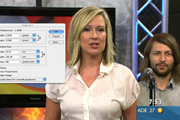
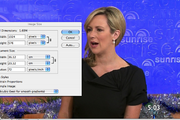
I've been wondering why so many of the pics posted are a lot smaller than they used to be even though the file sizes are the same or larger, so I took one of today's pics of Mel and one from roughly the same time last year. Now please understand, I'm not complaining in the least, but I am completely baffled . . . it's also important to note that I'm Mac based, so all the talk about different types of video cards for Windows machines means as much to me as the study of sub-atomic particles. So here you go, the first pic of Mel is from Dec 1 2009 and has a file size of 249.6kB whereas the second is from today and has a file size 33% larger at 371.7kB But if you check the file size settings of both pics opened in Photoshop CS4* the first shot, with the smaller file size, is actually 350% larger than the second shot which has the larger file size. Anyone know what causes this? * The file size information shown in the PNG file relates to the original Jpgs not the posted PNB file - I had to change file type because the site wasn't recognising the original Jpeg with the image size info . . . no idea why
L 998x558 319
M 728x416 327
|
|
kirkbright
Carl Carlson
Joined: Sat Jun 14, 2008 6:57 am Posts: 542 Karma: 22.12 (144 thanks)
|
| Wed Dec 15, 2010 1:02 pm |
|
 |
|
by sharkboi » Fri Dec 17, 2010 5:05 pm
kirkbright wrote: I've been wondering why so many of the pics posted are a lot smaller than they used to be even though the file sizes are the same or larger, so I took one of today's pics of Mel and one from roughly the same time last year. Now please understand, I'm not complaining in the least, but I am completely baffled . . . it's also important to note that I'm Mac based, so all the talk about different types of video cards for Windows machines means as much to me as the study of sub-atomic particles. So here you go, the first pic of Mel is from Dec 1 2009 and has a file size of 249.6kB whereas the second is from today and has a file size 33% larger at 371.7kB But if you check the file size settings of both pics opened in Photoshop CS4* the first shot, with the smaller file size, is actually 350% larger than the second shot which has the larger file size. Anyone know what causes this? * The file size information shown in the PNG file relates to the original Jpgs not the posted PNB file - I had to change file type because the site wasn't recognising the original Jpeg with the image size info . . . no idea why I would say it's most likely related to compression ratio...

|
|
sharkboi
Troy McLure
Joined: Sat Mar 21, 2009 10:11 am Posts: 26463 Karma: 295.49 (78195 thanks) Location: At my computer
|
| Fri Dec 17, 2010 5:05 pm |
|
 |
|
by Xfactor » Mon Dec 20, 2010 4:11 pm
I've hit another snag with capping, i won't be doing my usual Channel 10 morning tv caps - lots (and LOTS) of rain in Victoria over night. Lounge room is out of bounds for the time being  - my electrical equipment is still good - i am just limited in regards to where i can plug anything in.
|
|
Xfactor
Ned Flanders
Joined: Sun May 04, 2003 3:13 pm Posts: 2112 Karma: 61.13 (1291 thanks) Location: Australia
|
| Mon Dec 20, 2010 4:11 pm |
|
|
Who is online |
Users browsing this forum: No registered users and 4 guests |
|
You cannot post new topics in this forum You cannot reply to topics in this forum You cannot edit your posts in this forum You cannot delete your posts in this forum
|
Since you are here... AusCelebs Forums is a non-profit, non-commercial, no-advertising, most popular community website of it's kind dedicated to Australian celebrities, run by unpaid volunteers. Every month we need to pay our server hosting costs and we depend entirely on donations to pay these fees. We thank all those who have donated and made it possible for us to continue providing this valuable service to our community, but if you haven't, please consider a donation.
|